TandemYTC - Tandem YOLO + Temporal Classifier
TandemYTC means Tandem YOLO + Temporal Classifier. It provides a Qt workspace for full-video behavior annotation, YOLO-pose review overlays, temporal-model training, and bounded-latency inference.
Use this plugin when the behavior model should learn from complete videos rather than pre-cut clips. Approved spans become behavior labels, and unlabeled frames remain available as background/other context for boundary and transition learning.
Start A Project
- Open Plugins -> TandemYTC.
- Import videos or a video folder.
- Add behavior names, colors, and definitions.
- Configure project hotkeys from the Edit menu.
- Select a behavior and annotate spans on the timeline.
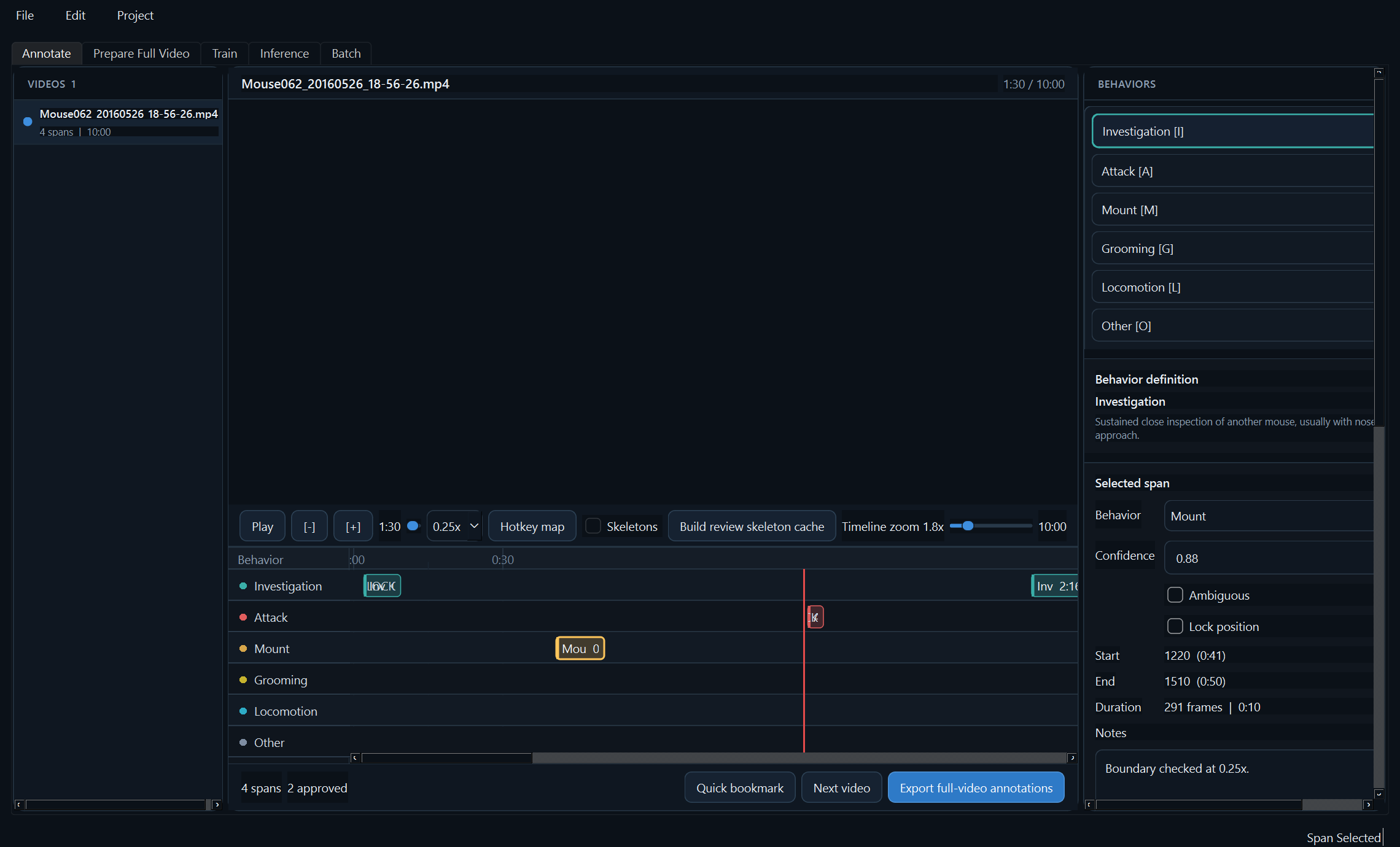
The annotation workspace supports playback, frame stepping, speed control, timeline zooming, span locking, notes, confidence, and Draft/Ready/Approved/Rejected review states.
Annotation edits, behavior definitions, hotkeys, metadata, video paths, and the current review position are saved into the project database as you work. Use File -> Save project or Ctrl+S to flush the current resume position immediately. Use File -> Export project database when you want a portable copy for backup, sharing, or review on another machine.
GUI Tour
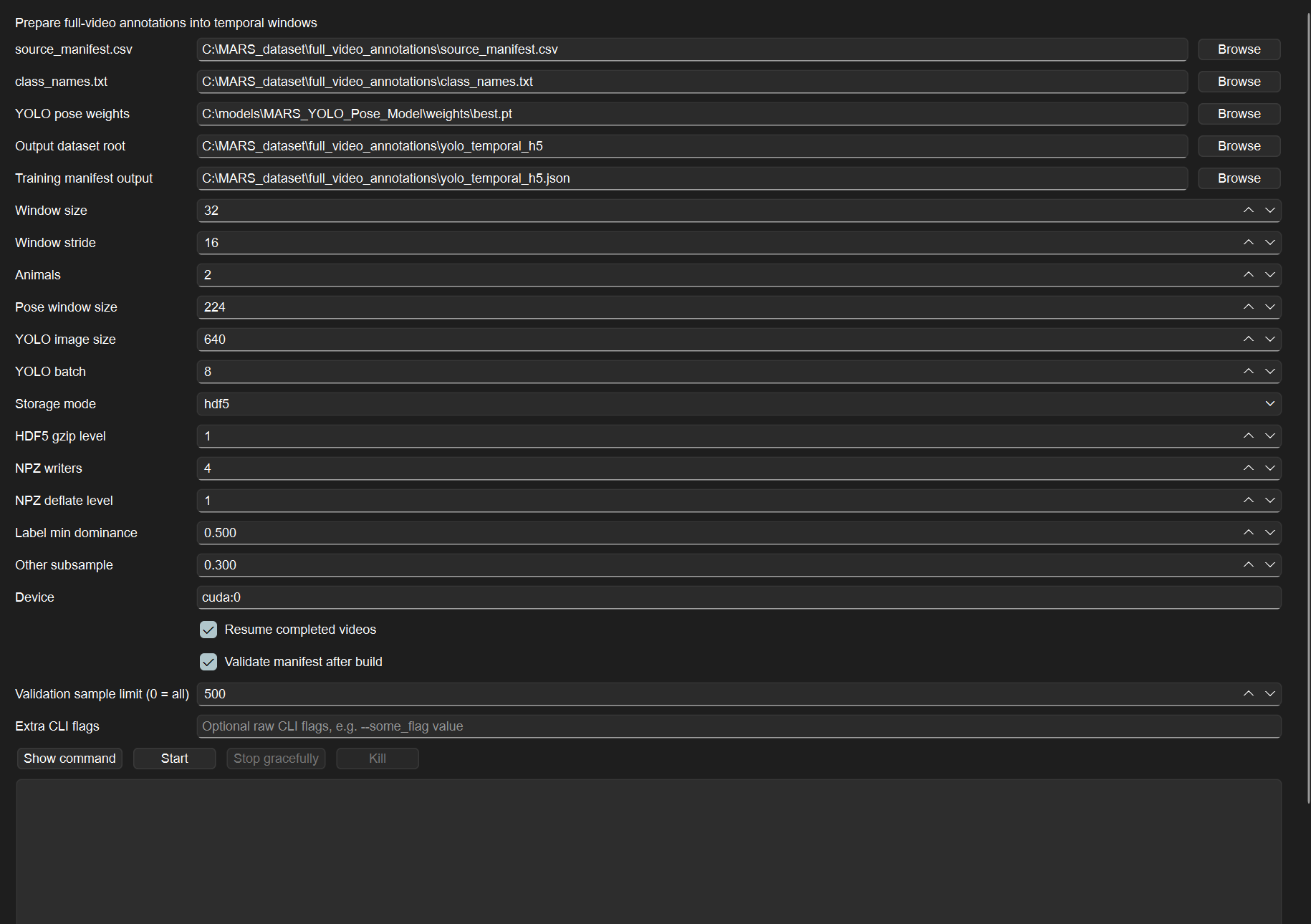
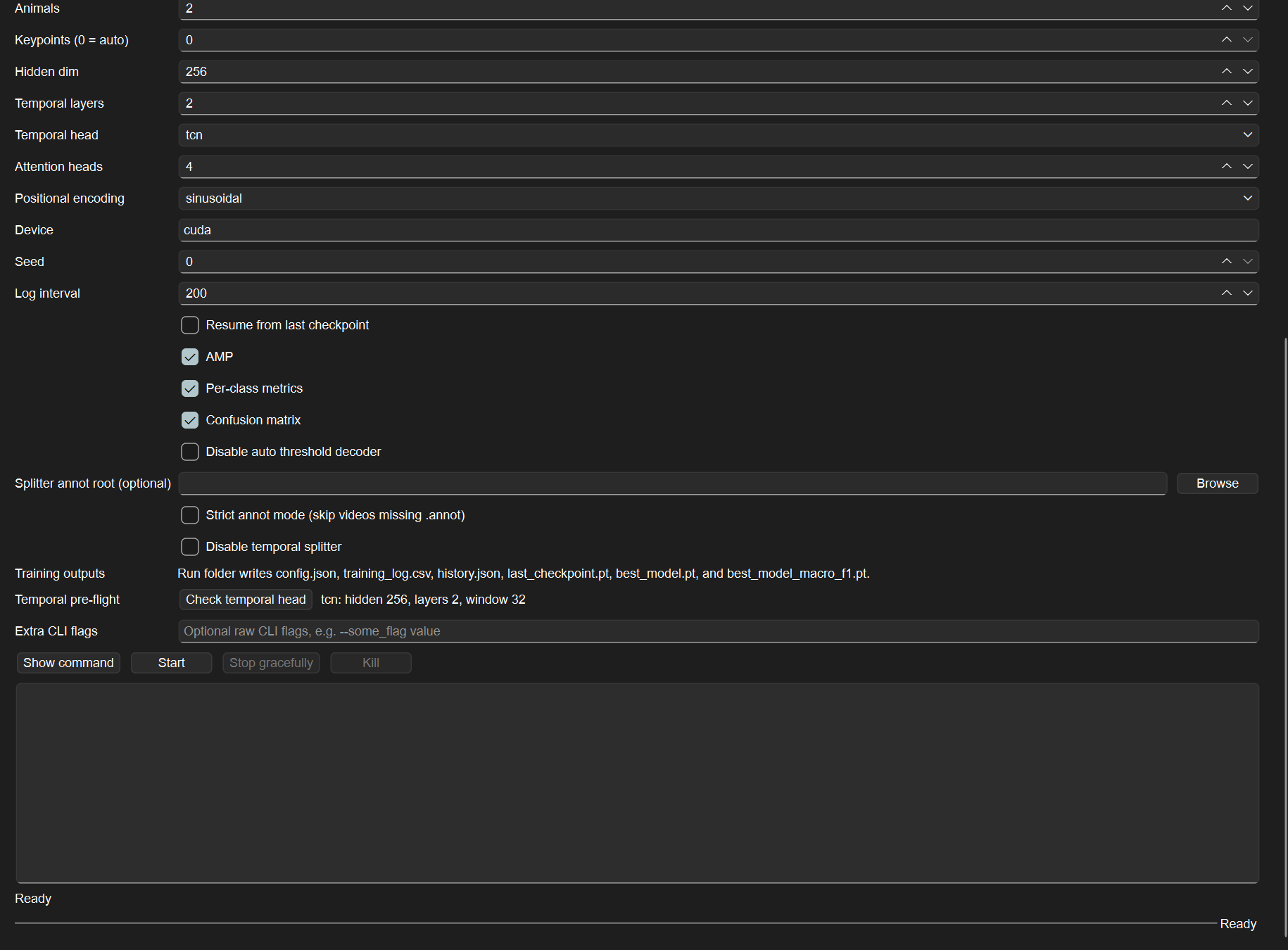
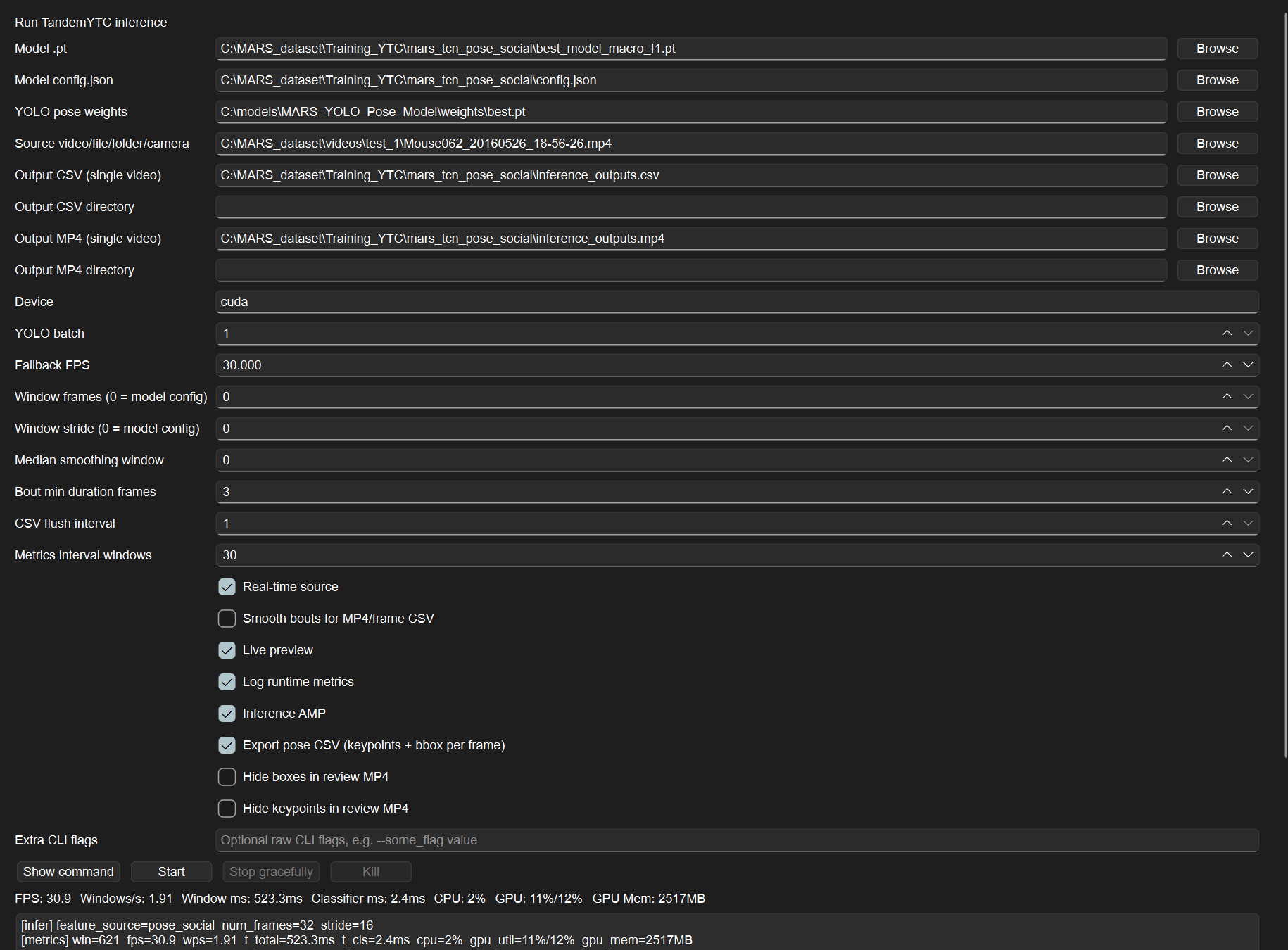
The screenshots below are maintained documentation assets captured from the TandemYTC Qt interface. They show the GUI layout and workflow controls, not a completed scientific result.
Review With Skeletons
Skeleton overlays are part of the TandemYTC annotation workspace, not the main IntegraPose Tab 2. They are review aids for checking labels against pose detections while the behavior timeline stays visible.
To create a skeleton overlay cache:
- Open Plugins -> TandemYTC and load or create a TandemYTC project.
- Add/select a video in the annotation workspace.
- Click Build review skeleton cache.
- Select the YOLO-pose
.ptweights if the project has not stored them yet. - Wait for the builder to finish. The cache is written under the user cache directory for that TandemYTC project and video.
- Enable Skeletons after the cache is available.
The Skeletons checkbox only displays an existing cache. If no cache has been built or loaded for the current video, the overlay cannot be enabled.
This cache is only for review. It does not replace the full-video preparation step used for training.
Export Annotations
Use Project -> Export full-video annotations after spans are approved.
The export folder includes:
source_manifest.csvclass_names.txt- one
.annotfile per video full_video_annotations.jsonfull_video_annotations.batch.jsonpreflight_report.json
The Prepare Full Video tab is filled automatically with the export paths so the next step can build temporal windows.
In the Prepare Full Video tab, source_manifest.csv is the annotation-export input. Training manifest output is the JSON file written by the prepare step, defaulting to <Output dataset root>/sequence_manifest.json; use that JSON as the Train tab's Training manifest JSON. Do not point the Train tab at source_manifest.csv.
Prepared Storage Contents
Prepare Full Video runs YOLO-pose over each source video and emits sliding-window training samples. The default hdf5 storage mode writes one compact pose/social .h5 file per source video and records window start/end ranges in sequence_manifest.json. The npz debug mode writes one pose/social .npz file per accepted window.
NorPix .seq sources are converted to cached MP4 files under the output dataset root before YOLO processing, because Ultralytics expects standard image/video formats.
Each stored window provides the inputs used by training:
- Pose arrays: pose-window-normalized keypoints, original-frame keypoints, per-keypoint confidence, per-animal pose confidence, and pose-valid masks.
- Detection reliability: animal-present masks, pose-window coverage confidence, track confidence, normalized track age, and track IDs.
- Social geometry: per-pair relation features for every ordered animal pair, plus relation masks and relation confidence.
- Debug geometry: animal/group bounding boxes and pose-normalization windows.
- Window metadata: schema version, body-length scale, animal count, and the label/start/end/source metadata recorded in
sequence_manifest.json.
Feature Calculations
TandemYTC stores detector outputs and computes the classifier features from those arrays. The feature design is keypoint-agnostic: it does not assume that a specific keypoint index is a nose, tail base, or paw.
Per-Animal Pose-Self Features
For each animal and frame, YOLO-pose keypoints are first normalized into the pose-normalization window for that animal. Let K be the number of keypoints and let each keypoint be (x, y, confidence) with x and y clipped to [0, 1].
The pose-self vector contains:
| Feature group | Size | Calculation |
|---|---|---|
| Centered keypoint coordinates | K * 3 |
For each keypoint, subtract 0.5 from normalized x and y; keep confidence as the third value. This preserves position within the animal window while reducing translation dependence. |
| Pairwise keypoint distances | K * (K - 1) / 2 |
Euclidean distance between every unordered keypoint pair using normalized (x, y) coordinates. |
| Keypoint speeds | K |
Per-frame Euclidean displacement of each normalized keypoint from the previous frame. The first frame speed is zero. |
Total per-animal pose-self dimension is:
K * 3 + K * (K - 1) / 2 + K
For the MARS 7-keypoint pose model, that is 7 * 3 + 21 + 7 = 49 pose-self features per animal per frame, before the learned encoder.
Reliability And Tracking Features
The temporal classifier also receives four per-animal reliability features:
| Feature | Calculation |
|---|---|
| Pose confidence | Mean keypoint confidence for that animal in the frame; zeroed when the animal is not present. |
| Pose-window coverage confidence | Fraction of the intended pose-normalization window that lies inside the source frame. Values near zero indicate that the animal window is mostly out of frame. |
| Track confidence | YOLO detection confidence assigned to the animal slot; zeroed when absent. |
| Track age | Number of frames since the current track ID was first seen, divided by 30 and clipped to [0, 1]. |
These features tell the model whether a behavior prediction is supported by stable pose evidence or by weak/missing detections.
Pairwise Social Geometry
For every ordered animal pair (i, j), where i != j, TandemYTC computes an 11-value relation vector. Distances and velocities are normalized by body_length_px, which is estimated from the video/dataset calibration. If either animal is absent, the relation is masked out.
| Index | Feature | Calculation |
|---|---|---|
| 0 | Centroid distance | Euclidean distance between bounding-box centers, divided by body_length_px. |
| 1 | Bounding-box IoU | Intersection-over-union of the two animal bounding boxes. |
| 2 | Overlap over smaller box | Intersection area divided by the smaller box area, capped at 5.0. This captures heavy overlap even when IoU is diluted by a larger box. |
| 3 | Relative aspect ratio | (width_i / height_i) / (width_j / height_j), with small epsilons to avoid division by zero. |
| 4 | Relative x velocity | Difference between animal j and animal i centroid x-velocity, in body lengths per second. |
| 5 | Relative y velocity | Difference between animal j and animal i centroid y-velocity, in body lengths per second. |
| 6 | Minimum keypoint-pair distance | Minimum Euclidean distance between any keypoint of animal i and any keypoint of animal j, divided by body_length_px. |
| 7 | Body axis alignment toward partner | Confidence-weighted PCA estimates animal i's body axis from its keypoints. The feature is abs(cos(theta)) between that axis and the direction from i to j. |
| 8 | Relative body-axis delta | abs(sin(angle_delta)) between the PCA body axes of animals i and j. Parallel and anti-parallel axes are treated equivalently because PCA axis sign is arbitrary. |
| 9 | Approach velocity | Animal i centroid velocity projected onto the unit direction from i to j, in body lengths per second. Positive values mean animal i is moving toward animal j; negative values mean retreat. |
| 10 | Contact estimate | 1.0 when minimum keypoint-pair distance is below 0.35 body lengths, otherwise 0.0. |
Features 0-5 use bounding boxes and are available when both animals are detected. Features 6-10 require valid pose for both animals. The relation pose mask tells the classifier which pose-conditional relation values are active.
PCA Body Axis
For orientation-related social features, TandemYTC estimates each animal's body axis with confidence-weighted PCA over its keypoints:
- Keep keypoints with confidence above the pose confidence threshold.
- Compute the confidence-weighted keypoint centroid.
- Compute the weighted covariance matrix of centered keypoint positions.
- Use the eigenvector with the largest eigenvalue as the body-axis direction.
PCA axes are undirected: the sign of the eigenvector is arbitrary. TandemYTC therefore uses sign-invariant quantities such as abs(cos(theta)) and abs(sin(angle_delta)). This is intentional; without a reliable semantic head/tail convention, the model should not be given a false directional label.
Temporal Input
At training time, pose-self features, reliability features, and social-geometry features are encoded into per-frame tokens and passed to the selected temporal head. Full-video preparation supplies windows that include behavior bouts, boundaries, and background context. At inference time, the same feature construction runs in a streaming window so latency remains bounded.
Use hdf5 for normal projects because overlapping windows share the same per-video pose/social store instead of duplicating window files. Use npz only when you need simple per-window files for debugging.
Train
The Train tab launches the temporal classifier training script. Its Training manifest JSON field must point to the sequence_manifest.json or custom .json output from Prepare Full Video. source_manifest.csv belongs to the Prepare Full Video tab and cannot be used directly for training. Available heads are:
tcntcn_attentiongated_attention_lstmattention_lstmlstm
Use this table when choosing the temporal head:
| Head | Reads from | Benefit | Cost |
|---|---|---|---|
tcn |
Final token from causal TCN stack | Fastest temporal head; strong real-time default | Uses less explicit full-window pooling |
tcn_attention |
Attention-weighted summary after causal TCN | Keeps TCN speed while using broader window evidence; can help boundaries | Slightly more compute than tcn |
lstm |
Final LSTM output token | Simple recurrent baseline; comparable to older YOLO+LSTM logic | Slower than TCN; may underuse earlier frames |
attention_lstm |
Multi-head attention-weighted summary after LSTM | Better when behavior evidence is spread across the window | More compute and parameters than plain LSTM |
gated_attention_lstm |
Learned gated attention summary after LSTM | Stronger frame weighting; useful for subtle transitions and noisy frames | Highest capacity of the current lightweight heads; more overfitting risk |
Click Check temporal head before training to see the selected head capacity, hidden width, temporal layers, attention settings, and manifest summary.
Training uses full-video windows. Inference uses streaming windows so latency remains bounded.
Each run writes into Run project folder / Run name. The run folder contains config.json, training_log.csv, history.json, last_checkpoint.pt, best_model.pt, and best_model_macro_f1.pt. training_log.csv is updated once per epoch with validation metrics and hardware telemetry, and the live log/progress bar shows epoch progress while the process runs. Use Resume from last checkpoint to continue from last_checkpoint.pt.
TandemYTC loads checkpoints in PyTorch weights-only mode. A legacy checkpoint that requires executable pickle objects is blocked by default. Only for a checkpoint from a trusted source, set INTEGRAPOSE_ALLOW_UNSAFE_MODEL_LOAD=1 before launching IntegraPose; otherwise regenerate or convert the checkpoint with a current runtime.
Use Stop gracefully to request a clean training stop. TandemYTC writes stop_training.flag; the trainer checks it before epochs and during training, then exits through the normal checkpoint/log path. Kill force-stops the process and should only be used if the graceful stop does not respond.
Infer
Use the Inference tab for one video, a folder, a camera index such as 0, or an RTSP/HTTP stream. Enable Real-time source for live runs. Use the Batch tab for folders.
TandemYTC writes prediction CSVs and can also write annotated review videos with boxes, keypoints, and behavior labels. When Log runtime metrics is enabled, the inference run also writes a sidecar metrics CSV and updates the live telemetry strip with processed FPS, windows/sec, per-window latency, classifier time, CPU load, GPU utilization, and GPU memory.